
Environments at scale: blueprints, builds & rollout
Every session starts from a snapshot of the environment. That single fact makes environments an admin concern, not a per-user preference: a broken or slow environment taxes every member's sessions, and every minute a session spends re-installing dependencies or fighting a bad build is ACUs your org pays for. A healthy environment is the cheapest performance upgrade you can give a team.
Environments are defined by blueprints, and blueprints stack in a hierarchy: an enterprise blueprint at the top, an org blueprint below it, and a repo blueprint at the bottom. Lower tiers layer on top of higher ones. The enterprise tier is where company-wide plumbing belongs: shared runtimes, security and compliance tooling, internal CLIs, and package-registry plus proxy and certificate config. Org and repo tiers add what only that team or that codebase needs.
The rule to internalize, because this course will use it three times, is the highest-tier rule: put each thing at the highest tier where it's truly shared. Company-wide registry config goes in the enterprise blueprint; one team's toolchain goes in their org blueprint; one repo's build quirk goes in its repo blueprint. Push things too low and you maintain the same config in twenty places; push them too high and one team's quirk becomes everyone's baggage. The same rule returns for secrets in Lesson 5 and knowledge in Lesson 7.
The build lifecycle. Change a blueprint and a build runs; a successful build produces a snapshot; sessions start from the snapshot. Builds are also triggered on a schedule to keep snapshots fresh. Each build lands in a status you can read at a glance, and you can pin an org to a known-good snapshot when you need stability, for example during a release freeze. Pinning is a pause button, not a fix: a pinned org slowly drifts from reality, so never use it as a substitute for fixing a flaky build.
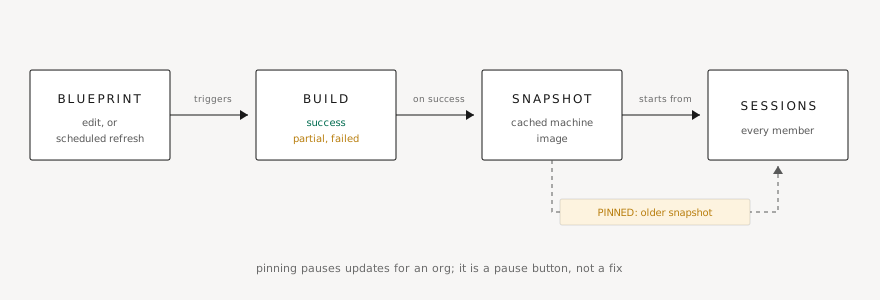
Build health is a standing admin duty. Set a review cadence for build status across your orgs, read build logs when something fails (they tell you which step broke, and usually why), and treat partial builds as an early warning rather than a pass: a build that half-succeeds today is often the one that fails outright next week.
Rollout. Enterprise blueprint changes move through three states: Testing → Available → Enabled by default. Testing lets you verify builds without touching anyone; Available lets individual orgs opt in; Enabled by default puts everyone on it. Per-org overrides and rollback paths exist at each stage. The phased playbook: make the change in Testing, verify the builds, make it Available to one canary org, watch their sessions for a few days, then enable by default. Lesson 8 picks this pattern back up as the organizational rollout playbook for Devin itself.