
Two Mental Models: Local vs. Cloud
Optional reading: go deeper
You have seen Devin described as another engineer on your team. To put that to work, hold two mental models side by side: the local agent you already know, and the cloud agent you are learning to delegate to.
A local agent can be Devin Desktop, Devin CLI, Cursor, or Claude Code. It is an extension of your hands, living in your editor, on your filesystem, inside your active attention. You steer it constantly: complete this line, refactor this function, explain this error. You accept or reject every suggestion. Your machine, your context, your control. That fits when you already know what to build and just need typing speed, when the task needs your judgment at every step, or when the scope is a single file.
A cloud agent is a team member receiving an assignment. You delegate a task and Devin goes off to its own isolated machine: it clones the repo, reads the codebase, makes its own implementation decisions, runs the tests, iterates on failures, and opens a pull request, all while you context-switch to something else. You are not in the loop for every keystroke. You come back to a finished artifact and review it, the same way you would with another engineer on your team: assign the task, check the output, leave feedback if needed.
| Local agent | Cloud agent | |
|---|---|---|
| Where it runs | Your editor and filesystem | Its own isolated VM |
| Your role | Driver, steering every step | Reviewer of a finished PR |
| Best for | Single-file work, real-time judgment, typing speed | Well-defined, verifiable, multi-file work you can hand off |
The mindset shift is from driving to delegating. The biggest failure mode for teams adopting cloud agents is treating them like local ones: watching the session timeline tick by, intervening constantly, or handing over a one-line task that wastes an agent built for complex, multi-file work. You are not the driver anymore.
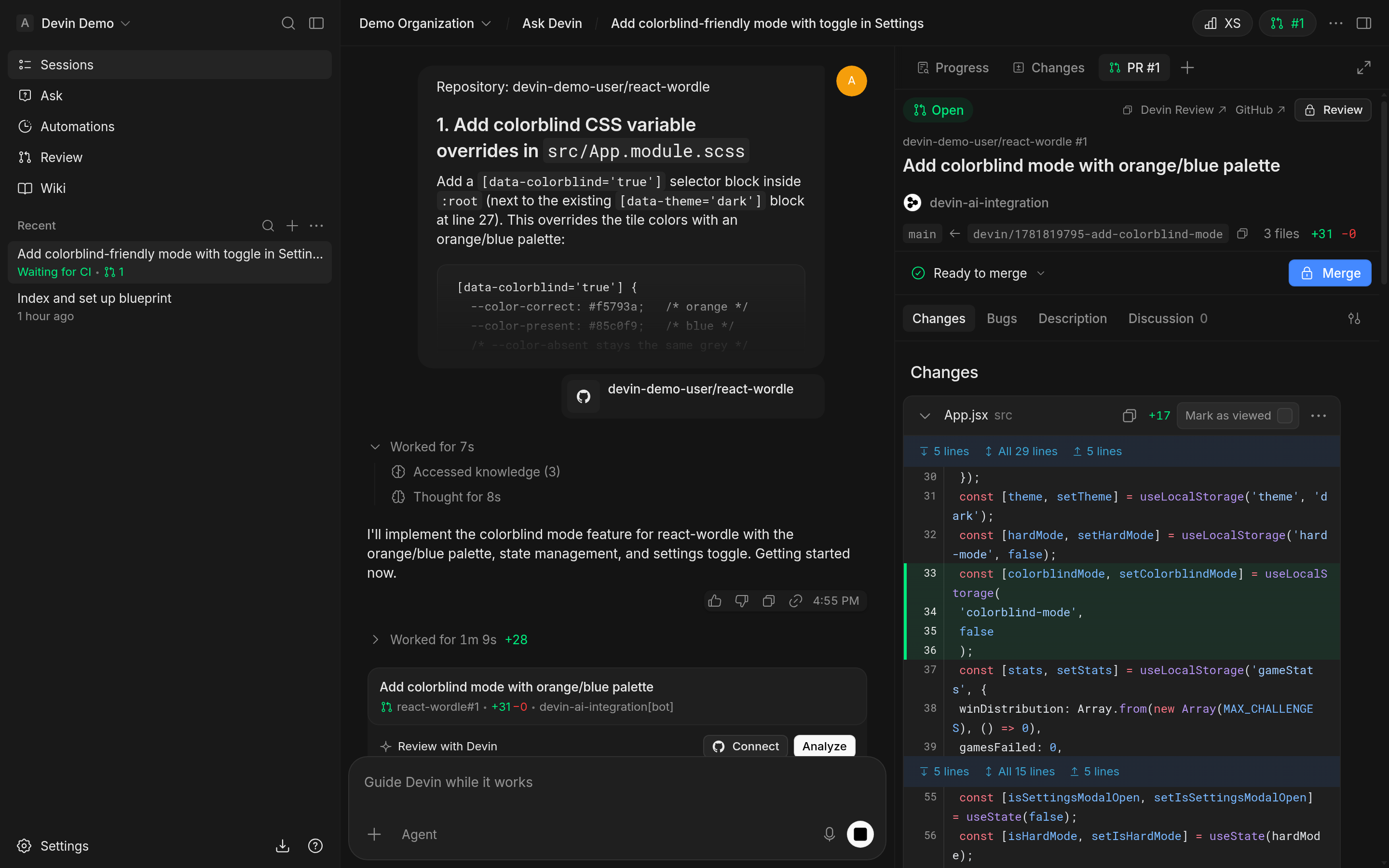
On the screen, look for:
- Prompt: the task description in the center session pane.
- Timeline: the activity stream showing the agent's autonomous work.
- Pull request: the results panel on the right, including the merge action.
- Runtime: the session duration in the session header, which you can compare with your review time.